
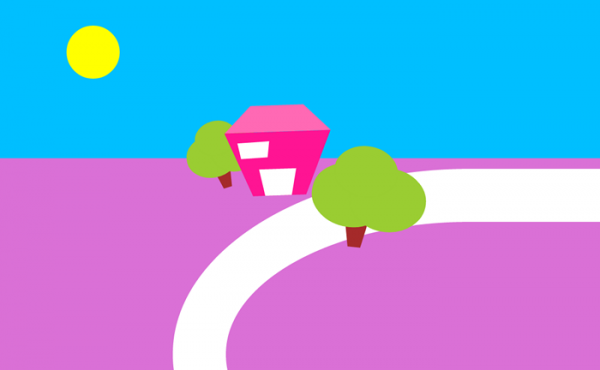
Dibujar un paisaje con CSS3
En esta ocasión veremos cómo dibujar un paisaje sencillo y colorido usando solamente CSS3.
Veamos el resultado final:

Crear formas irregulares usando Bordes
Comenzaremos con la técnica para hacer el edificio, puerta, ventana y troncos. Veamos qué pasa si formamos un cuadrado o rectángulo y desde el CSS3 le damos bordes bien anchos y, a cada borde, le damos un color diferente. Nos quedaría este resultado:

css
<style type="text/css">
   .recuadro1{
   width:0px;
      border-top:50px solid violet;
      border-right:50px solid pink;
      border-bottom:50px solid yellow;
      border-left:50px solid limegreen;
      }
   </style>
html5
<div id="ejemplo"></div>
Si le damos un ancho y ponemos en color transparente a 3 lados podemos obtener la siguiente forma:

.recuadro1{
   width:100px;
   height:100px;
   border-top: 0px solid transparent;
   border-left: 50px solid transparent;
   border-right: 50px solid transparent;
   border-bottom: 50px solid hotpink;
   }
Fíjense que el border-top está en 0 px.
De esos resultados nos valdremos para crear formas, en este caso haremos un edificio en una extraña perspectiva, tipo cartoon encimando 2 capas, una con borde inferior y la otra con borde superior:

.recuadro{
   position:relative;
   width:100px;
   height:50px;
   border-top: 120px solid deeppink;
   border-left: 50px solid transparent;
   border-right: 50px solid transparent;
   border-bottom: 0px solid transparent;
   transform:rotate(-2deg); /*esto es para dejar mas cute al dibujo*/
   z-index:3;
   }

.recuadro1{
   position:relative;
   width:100px;
   height:100px;
   border-top: 0px solid transparent;
   border-left: 50px solid transparent;
   border-right: 50px solid transparent;
   border-bottom: 50px solid hotpink;
   transform:rotate(-2deg);
   margin:-270px 0 0 -5px;
   z-index:2;
   }
Con esta sola premisa podemos encimar diferentes capas con estas propiedades y así vamos formando nuestras figuras. también podemos en vez de encimar capas, usar :after y :before con posiciones absolutas.
Dibujar el edificio con css3
Como ya lo básico está explicado contaré como ir formando los elementos y al final pongo el codigo completo y el demo.
Márgenes

Agregamos la ventana y la puerta, todo esto con positiones relativas y usando z-index.
Dibujar los árboles
Se acuerdan del tutorial de Animación de nubes con CSS3? Usaremos la misma técnica para hacer los árboles.
Tendremos 3 capas y las encimaremos. Luego les daremos forma redondeada con border-radius:

El tronco
Se hace igual que con el edificio, sólo que lo haremos más alto y fino. A estos también les daremos una leve rotación para darle más perspectiva al dibujo.
Dibujar un camino
La calle que está al lado de la casa es una capa con border-radius ovalado y bastante grosor.
.calle{
   width:1700px;
   height:500px;
   border-radius: 800px / 500px;
   behavior: url(pie.htc);
   border:100px solid white;
   position:relative;
   z-index:22;
   }
Hacerlo crossbrowser
border transparent
El render en Firefox y Ópera


border transparent en IE-6

   /*----------------hack transparencia ie6 WTF!! >o< ----------*/

      *html .recuadro, *html .tronco, *html .ventana, *html .puerta
         {
         border-left: pink;
         border-right: pink;
         border-bottom: pink;
         filter: chroma(color=pink);
         }

      *html .recuadro1
         {
         border-left: pink;
         border-right: pink;
         border-right: pink;
         filter: chroma(color=pink);
         }
y la magia negra ocurre 
Y qué pasa con los elementos rotados en IE?
Lamentablemente, IE tiene filtro para rotar, pero sólo hay 4 grados de rotación. Se puede usar también algún javascript, pero estas rotaciones utilizadas en el tutorial son muy sutiles, por lo que si no están no es una gran pérdida. No vale la pena recurrir a tanta magia negra por sólo 2 grados, no creen?

En la imagen solo habría que modificar un poco el margen y listo, pero la verdad… qué pereza no?? lo mismo para IE7, pero quién usa IE7?? 
Para los prefijos automáticos y los bordes redondeados utilicé prefix-free y css-pie.htc.
Y aquí el código final y el demo.
HTML5
<!DOCTYPE HTML>
<html lang="en-US">
   <head>
      <meta charset="UTF-8">
      <title>Ejemplo::Paisaje en CSS3</title>
      <link rel="stylesheet" type="text/css" href="style.css" media="all" />
      <script src="prefixfree.min.js"></script>
   </head>
   <body>
      <div id="cuadro">
         <div class="sol"></div>
         <div class="tree1">
            <div class="arbol1"></div>
            <div class="arbol2"></div>
            <div class="arbol3"></div>
            <div class="tronco"></div>
         </div>
         <div class="edificio-todo">
            <div class="puerta"></div>
            <div class="ventana"></div>
            <div class="recuadro1"></div>
            <div class="recuadro"></div>
         </div>
         <div id="calle-cont">
            <div class="calle"></div>
         </div>
         <div class="tree">
            <div class="arbol1"></div>
            <div class="arbol2"></div>
            <div class="arbol3"></div>
            <div class="tronco"></div>
         </div>
      </div>
   </body>
</html>
CSS3
body{
background:deepskyblue;
border-bottom: 400px solid orchid;
font-family: "Trebuchet MS", Arial, sans-serif;
}
*{
margin:0;
}
/*------------------ejemplo  ------------*/
.recuadro{
position:relative;
width:100px;
height:50px;
border-top: 120px solid deeppink;
border-left: 50px solid transparent;
border-right: 50px solid transparent;
border-bottom: 0px solid transparent;
transform:rotate(-2deg);
z-index:3;
}
.recuadro1{
position:relative;
width:100px;
height:100px;
border-top: 0px solid transparent;
border-left: 50px solid transparent;
border-right: 50px solid transparent;
border-bottom: 50px solid hotpink;
transform:rotate(-2deg);
margin:-270px 0 0 -5px;
z-index:2;
}
.ventana{
position:relative;
margin:-200px 0 0 -5px;
right:-30px;
width:50px;
height:70px;
border-top: 30px solid white;
border-left: 5px solid transparent;
border-right: 5px solid transparent;
border-bottom: 0px solid transparent;
transform:rotate(-4deg);
z-index:4;
}
.puerta{
position:relative;
margin:130px 0 0 -5px;
right:-70px;
width:50px;
height:100px;
border-top: 50px solid white;
border-left: 10px solid transparent;
border-right: 10px solid transparent;
border-bottom: 0px solid transparent;
transform:rotate(-2deg);
z-index:5;
}
#cuadro{
width:80%;
height:200px;
padding:50px;
margin:0 auto;
}
.sol{
width:100px;
height:100px;
border-radius:100px;
behavior: url(pie.htc);
background:yellow;
}
.tree1{
width:200px;
height:180px;
margin:50px 0 0 230px;
position:relative;
z-index:20;
transform: scale(0.8) rotate(-15deg);
}
.edificio-todo{
width:300px;
height:200px;
margin:-190px 0 0 300px;
position:relative;
z-index:21;
}
#calle-cont{
width:93%;
height:380px;
overflow:hidden;
position:relative;
margin:-200px 0 0 200px;
}
.calle{
width:1700px;
height:500px;
border-radius: 800px / 500px;
behavior: url(pie.htc);
border:100px solid white;
position:relative;
z-index:22;
}
.tree{
width:200px;
margin:-380px 0 0 500px;
position:relative;
z-index:23;
transform: scale(1.2) rotate(8deg);
}
.arbol1{
width:100px;
height:80px;
border-radius:100px /80px;
behavior: url(pie.htc);
background:yellowgreen;
position:relative;
z-index:9;
}
.arbol2{
width:120px;
height:100px;
border-radius:120px /100px;
behavior: url(pie.htc);
background:yellowgreen;
transform:rotate(-2deg);
margin:-50px 0 0 30px;
position:relative;
z-index:8;
}
.arbol3{
width:120px;
height:100px;
border-radius:100px /80px;
behavior: url(pie.htc);
background:yellowgreen;
transform:rotate(5deg);
margin:-100px 0 0 -30px;
position:relative;
z-index:7;
}
.tronco{
width:20px;
height:200px;
border-top: 50px solid brown;
border-left: 10px solid transparent;
border-right: 10px solid transparent;
border-bottom: 0px solid transparent;
transform:rotate(-2deg);
z-index:6;
margin:-20px 0 0 30px;
position:relative;
}
/*----------------hack transparencia ie6 WTF!! >o< ----------*/
*html .recuadro, *html .tronco, *html .ventana, *html .puerta
{
border-left: pink;
border-right: pink;
border-bottom: pink;
filter: chroma(color=pink);
}
*html .recuadro1
{
border-left: pink;
border-right: pink;
border-right: pink;
filter: chroma(color=pink);
}
------------*/
.recuadro{
position:relative;
width:100px;
height:50px;
border-top: 120px solid deeppink;
border-left: 50px solid transparent;
border-right: 50px solid transparent;
border-bottom: 0px solid transparent;
transform:rotate(-2deg);
z-index:3;
}
.recuadro1{
position:relative;
width:100px;
height:100px;
border-top: 0px solid transparent;
border-left: 50px solid transparent;
border-right: 50px solid transparent;
border-bottom: 50px solid hotpink;
transform:rotate(-2deg);
margin:-270px 0 0 -5px;
z-index:2;
}
.ventana{
position:relative;
margin:-200px 0 0 -5px;
right:-30px;
width:50px;
height:70px;
border-top: 30px solid white;
border-left: 5px solid transparent;
border-right: 5px solid transparent;
border-bottom: 0px solid transparent;
transform:rotate(-4deg);
z-index:4;
}
.puerta{
position:relative;
margin:130px 0 0 -5px;
right:-70px;
width:50px;
height:100px;
border-top: 50px solid white;
border-left: 10px solid transparent;
border-right: 10px solid transparent;
border-bottom: 0px solid transparent;
transform:rotate(-2deg);
z-index:5;
}
#cuadro{
width:80%;
height:200px;
padding:50px;
margin:0 auto;
}
.sol{
width:100px;
height:100px;
border-radius:100px;
behavior: url(pie.htc);
background:yellow;
}
.tree1{
width:200px;
height:180px;
margin:50px 0 0 230px;
position:relative;
z-index:20;
transform: scale(0.8) rotate(-15deg);
}
.edificio-todo{
width:300px;
height:200px;
margin:-190px 0 0 300px;
position:relative;
z-index:21;
}
#calle-cont{
width:93%;
height:380px;
overflow:hidden;
position:relative;
margin:-200px 0 0 200px;
}
.calle{
width:1700px;
height:500px;
border-radius: 800px / 500px;
behavior: url(pie.htc);
border:100px solid white;
position:relative;
z-index:22;
}
.tree{
width:200px;
margin:-380px 0 0 500px;
position:relative;
z-index:23;
transform: scale(1.2) rotate(8deg);
}
.arbol1{
width:100px;
height:80px;
border-radius:100px /80px;
behavior: url(pie.htc);
background:yellowgreen;
position:relative;
z-index:9;
}
.arbol2{
width:120px;
height:100px;
border-radius:120px /100px;
behavior: url(pie.htc);
background:yellowgreen;
transform:rotate(-2deg);
margin:-50px 0 0 30px;
position:relative;
z-index:8;
}
.arbol3{
width:120px;
height:100px;
border-radius:100px /80px;
behavior: url(pie.htc);
background:yellowgreen;
transform:rotate(5deg);
margin:-100px 0 0 -30px;
position:relative;
z-index:7;
}
.tronco{
width:20px;
height:200px;
border-top: 50px solid brown;
border-left: 10px solid transparent;
border-right: 10px solid transparent;
border-bottom: 0px solid transparent;
transform:rotate(-2deg);
z-index:6;
margin:-20px 0 0 30px;
position:relative;
}
/*----------------hack transparencia ie6 WTF!! >o< ----------*/
*html .recuadro, *html .tronco, *html .ventana, *html .puerta
{
border-left: pink;
border-right: pink;
border-bottom: pink;
filter: chroma(color=pink);
}
*html .recuadro1
{
border-left: pink;
border-right: pink;
border-right: pink;
filter: chroma(color=pink);
}